CRUD - Create, Read, Update and Delete APIs
What is CRUD?
CRUD is an acronym for Create, Read, Update, and Delete. It is a set of operations that servers execute (POST, GET, PUT, PATCH, DELETE, etc). This is what each operation does:
- Create (
POST) — Make something - Read (
GET) — Get something - Update (
PUT/PATCH) — Change something (PUTis used to update the whole object,PATCHis used to update a part of the object) - Delete (
DELETE) —- Remove something
Great. Let's take a look at how these operations work.
These operations are not limited to Express. You can use them in any backend framework. HTTP methods are just to give a name to the operation. You can even use GET to create something, but it is not recommended. We will learn more about this in the coming docs.
What are we building
We're going to build a CRUD of books that allows you to keep track of data related to the books. For the sake of simplicity, we'll be using an array to store the data. But in the coming docs, we'll be using a database to store the data. So, let's get started.
Before you start, you should read the Data Manipulation in Array docs. It will help you to understand the built-in array methods that I will be using in this doc. You may skip this if you're already familiar with the array methods.
Getting started
Start by creating a folder for this project. Feel free to name it anything you want to, and navigate there, run the npm init command.
- npm
- Yarn
- pnpm
- Bun
npm init
yarn init
pnpm init
bun init
It creates a package.json file where will add scripts and manage dependencies that we install later. Now make some changes to the package.json file and create the index.js file, as we did in Basic Code.
Please add dev: nodemon index.js under script in the package.json file as we did in Basic Code, so that we can run the server using npm run dev command, don't need to restart the server every time we make changes to the code.
I would highly recommend you run every time your express.js app using nodemon when you are developing it so that you don't need to restart the server every time you make changes to the code.
Adding Books - CREATE
The CREATE operation is performed when you want to insert (save) data (typically into the database) and to do this POST request having data into its body is sent to the server. In Express, we handle a POST request with the post method:
app.post(path, callback);
The first argument, path, is the path of the request. It's anything that comes after your domain name like localhost:2022/book the path argument would be /book.
The second argument is a callback function that tells the server what to do when the path is matched. It takes in two arguments, a req (request object) and a res (response object):
Don't know what a request and response object is, must read it here. IT IS HIGHLY RECOMMENDED.
So, let's write some code to handle the POST request to the /book path:
// Importing package
import express from "express";

const app = express();
const port = 2022;

// Here I will keep books
let books = [];

// Configuring middlewares
app.use(express.json());
// POST API
app.post("/book", (req, res) => {
  // I will be coding here
});

app.listen(port, () =>
  console.log(`Hello world app listening on port ${port}!`),
);
I will be using the books array to store our collection of books, simulating a database.
I'm sending this data inside the request's body in JSON format:
{
  "name": "The Lord of the Rings",
  "author": "J.R.R. Tolkien",
  "publisher": "Allen & Unwin"
}
Browser doesn't support POST requests, so need to use some API testing tools like Postman, Insomnia, etc. to test the API. I will be using Postman in this doc.
This is how you can send a POST request to the server using Postman:
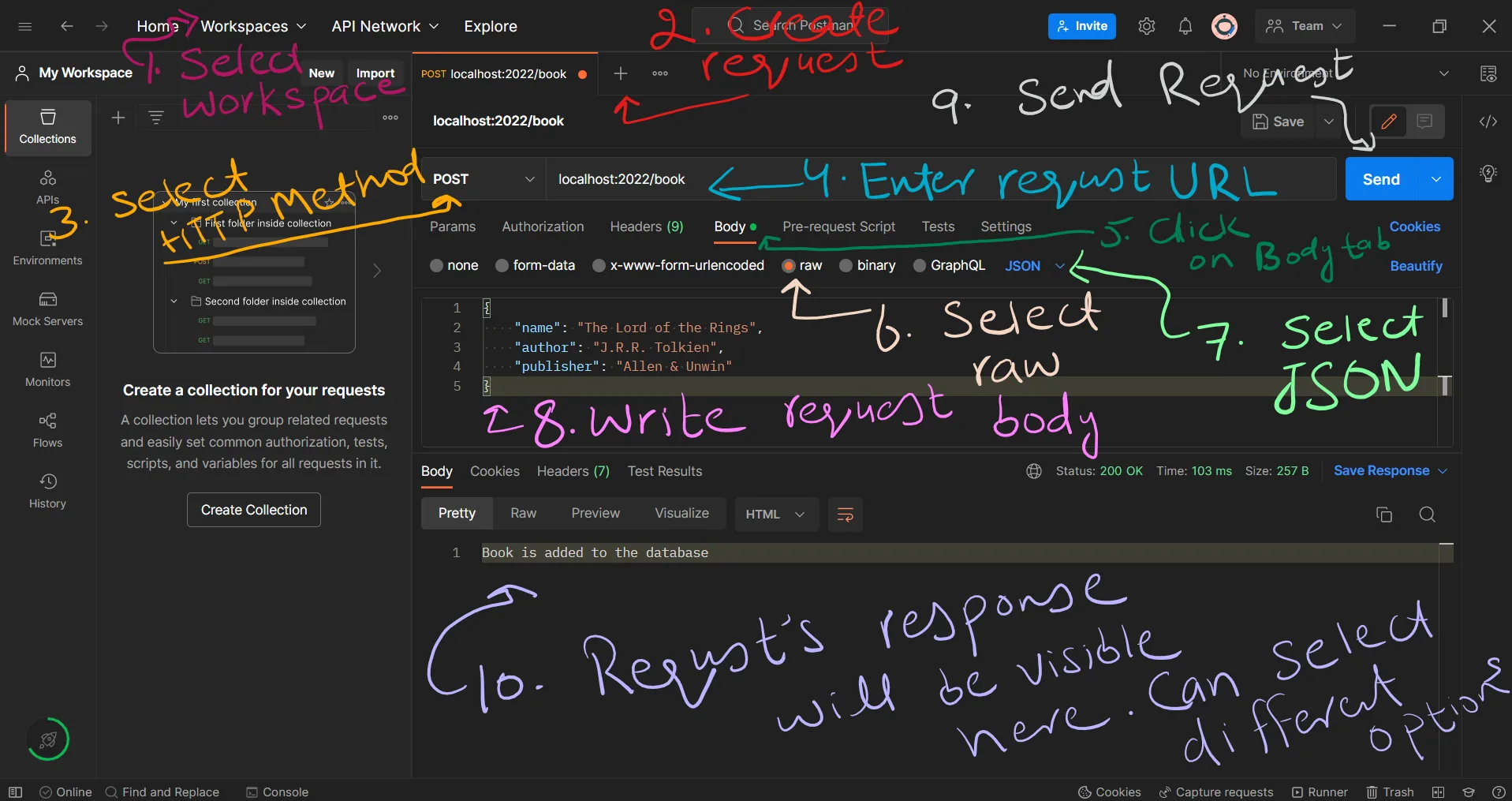
And then send it by clicking on the Send button, and you will see the response from the server in the Response section.
Inside the app.post() method let's add the book to the book array:
app.post("/book", (req, res) => {
  const book = req.body;

  // Here I am getting the last book's id and adding 1 to it, if there is no book then I am assigning 1 to the ID
  book.id = books.length ? books[books.length - 1].id + 1 : 1;

  // Output the book to the console for debugging
  console.log(book);

  // books.push(book) will insert the book object to the books array at the end of the array
  books.push(book);

  res.send("Book is added to the database");
});
Getting All Books - READ
The READ operation is performed when you want to get data from the server. To do this, a GET request is sent to the server. In Express, we handle a GET request with the:
app.get(path, callback);
Now let's create an endpoint to get all the books from the API:
app.get("/book", (req, res) => {
  res.json(books);
});
Add some books and open http://localhost:2022/book in your browser. You should see a JSON response with all the books that you've added. In this case, the JSON response will be like
[
  {
    "id": 1,
    "name": "The Lord of the Rings",
    "author": "J.R.R. Tolkien",
    "publisher": "Allen & Unwin"
  }
]
Get a Book by ID
If I'd like to display a specific book to the user, I'll need an API to retrieve it from the database (or the array, in our case). This is always done by a key specific to that entity. In most cases, each entity has a unique ID that helps us identify them. In our case, each book has an id that is unique by nature, so there's no need for another id value.
To get a specific book, we need to send a GET request to the server with the id of the book as a parameter in the URL. For example, if the id is 1 the URL would look like, http://localhost:2022/book/1:
app.get("/book/:id", (req, res) => {
  // Reading ID from the URL, + is used to convert string to number
  const id = +req.params.id;

  // Searching books for the id
  const book = books.find((book) => book.id === id);

  // Checking if the book is present
  if (book) {
    // Sending the book as a response with status code 200
    res.status(200).json(book);
  } else {
    // Sending error message with status code 404
    res.status(404).send("Book not found");
  }
});
Update Books - UPDATE
The UPDATE operation is performed when you want to update data that already exists in the database. For this operation, we need to send a PUT or PATCH request to the server. In Express, we handle a PUT request with the:
app.put(path, callback);
and a PATCH request with the:
app.patch(path, callback);
PUT and PATCH are similar, but PATCH is used to update only a part of the data provided in the body, while PUT is used to update the whole data means to replace the data with the provided data.
First I'll do PUT, where I'll replace the book's data with the provided data
app.put("/book/:id", (req, res) => {
  // Reading id from the URL
  const id = parseInt(req.params.id);
  const book = req.body;
  // req.body doesn't contain the ID, so we need to add it
  book.id = id;

  // Search books for the id and replace it with an object from the request
  for (let i = 0; i < books.length; i++) {
    if (books[i].id === id) {
      // Replace the book
      books[i] = book;
    }
  }

  res.send("Book is replaced");
});
Now PATCH, here I'll update the book's data with the provided data, and leave the rest of the data as it is:
app.patch("/book/:id", (req, res) => {
  // Reading id from the URL
  const id = +req.params.id;
  const book = req.body;
  book.id = id;

  // Search books for the id and update it with properties in the request
  for (let i = 0; i < books.length; i++) {
    if (books[i].id === id) {
      // Here I am using the spread operator (`...`) to take all the properties
      // from the previous book and add the new properties to it
      books[i] = { ...books[i], ...book };
    }
  }

  res.send("Book is updated");
});
Delete Books - DELETE
When deleting entities, typically we delete them one by one to avoid big accidental data loss. To delete items, use the HTTP DELETE method and specify a book using its id, just like how I retrieved it:
app.delete("/book/:id", (req, res) => {
  // Reading id from the URL
  const id = +req.params.id;

  // array.filter() method returns a new array with all the elements that pass the test implemented by the provided function
  books = books.filter((i) => i.id !== id);

  res.send("Book is deleted");
});
We are using the app.delete method to accept DELETE requests. I used the array filter method to filter out the book with the relevant ID to remove it from the array.
I explained the array.filter() method in detail in this article,, read it to understand it better.
Code
You can download the related code from here. You can also clone the repository and checkout to the example/crud-code branch.
git clone https://github.com/mrizwanashiq/learning-express-js.git
cd learning-express-js
git checkout example/crud-code
If you already have the repository cloned, you can pull the latest changes from the remote repository and checkout to the example/crud-code branch.
git pull
git checkout example/crud-code
Conclusion
In this article, I explained how to create a simple CRUD API using Express.js. For the sake of simplicity, I used an array to store the data, but in a real-world application, you'll use a database to store the data. This article is just to give you an idea of how to create a CRUD API using Express.js.