Normal Copy vs Shallow Copy vs Deep Copy
What is Copy?
Copy is a process of creating a new object in memory and storing the same values as the original object. There are three types of copy:
Let's look at each of them in detail.
For Primitive values normal copy is OK, but it behaves unexpectedly differently in non-primitive type. Why is that? We will see that below.
So, keep in mind that we are talking about objects, arrays, but not primitive values.
I would suggest to read this doc before. It will give you the better understanding of primitive, non-primitive types, and what is reference
Normal Copy
Normal copy of an object does not create a new object in memory at all — it only copies the reference, so both variables point to the same object. So, if we change the value of any property of the copied object, then the original object will also be affected as both the variables are referencing the same object in memory, as you can see in the below example.
const original = { a: 1, b: 2, c: 3 };
const copy = original;

original.a = 10;
console.log(copy.a); // 10

copy.b = 20;
console.log(original.b); // 20
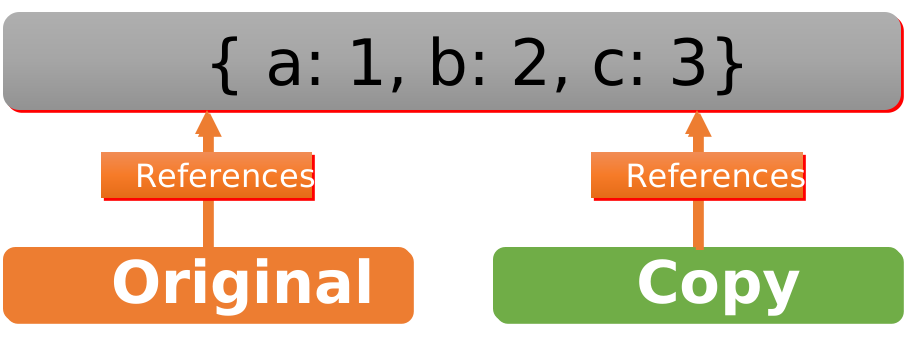
So, in short, normal copy is not a good idea to make a copy of an object. Because, if we change the value of any property of the new object, then the original object will also be affected, as both the objects are referencing the same values in memory.
What's the solution? 🤔
We can use shallow copy or deep copy to make a copy of an object depending on the object structure.
Let's look at each of them in detail.
Shallow Copy
It copies the values of the original object to the new object. To make shallow copy, we can use the spread operator ... to copy the values of the original object to the new object. Check the below example:
const original = { a: 1, b: 2, c: 3 }; // Object with 3 properties, no nested objects
const copy = { ...original }; // ... is spread operator, which copies the values of the original object to the new object

copy.a = 10; // Change the value of the a property of the new object to 10
console.log(original.a); // 1 (not affected)
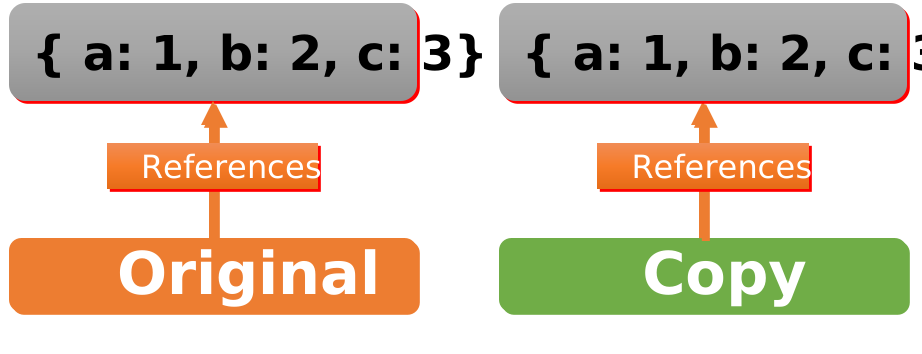
See, in the above example, we have changed the value of the a property of the new object, but the value of the a property of the original object is not affected. This is because, in shallow copy, we are only copying the values of the original object to the new object, not the reference of the original object. So, if we change the value of any property of the new object, then the original object will not be affected.
But if the object has a nested object (means have another object against any key), then it will copy the reference of the nested object of the original object, not the values. Check the below example:
const original = {
  a: 1,
  b: 2,
  c: 3,
  d: {
    e: 4,
    f: 5,
  },
}; // Object with 3 properties, 1 nested object with 2 properties

const copy = { ...original };

copy.d.e = 10; // Change the value of the e property of the nested object
console.log(original.d.e); // 10 (affected)
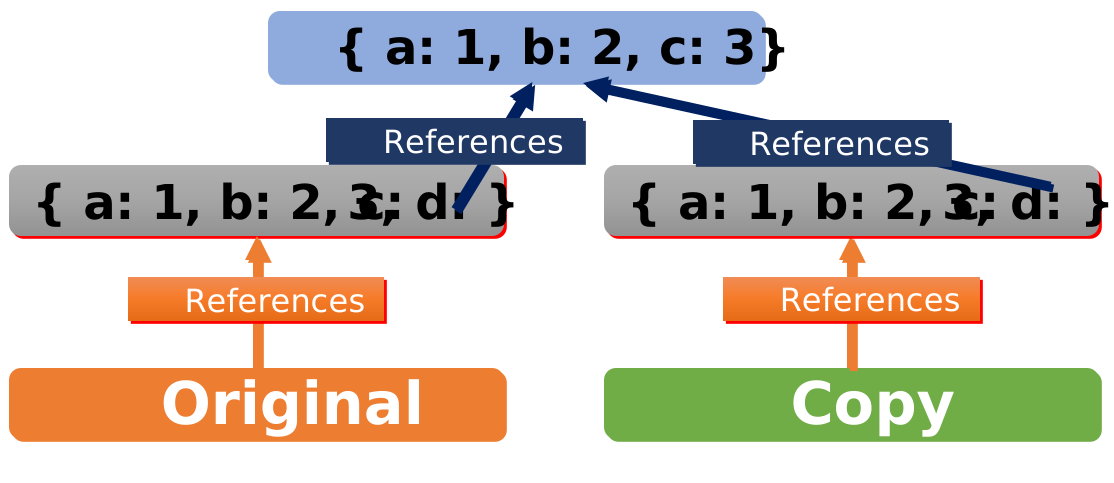
So, if the object has a nested object, then shallow copy has the same problem as normal copy. If we change the value of any property of the new object, then the original object will also be affected, as both the objects are referencing the same values in memory.
So, what's the solution? We can use deep copy to make a copy of an object.
Deep Copy
Deep Copy creates a new object in memory and recursively copies all nested values from the original object. There is multiple ways to create a deep copy of an object or array, but we will look at the most common ways.
JSON.parse(JSON.stringify(obj))
JSON.stringify() method converts a JavaScript object (or array) to a JSON string, and JSON.parse() method parses a JSON string and constructing the JavaScript value or object described by the string.
const original = { a: 1, b: 2, c: 3 }; // Object with 3 properties, no nested objects
const copy = JSON.parse(JSON.stringify(original)); // Deep copy

copy.a = 10; // Change the value of the a property of the new object
console.log(original.a); // 1 => The value of the a property of the original object is not affected
But, it'll copy the values of the original object to the new object (would not share the same reference), and if we change the value of any property of the new object, then the original object will not be affected, and this also applies to nested object.
But this method has a problem:
-
If the object has a function, then it will not be copied, as you can see in the below example:
JSON.parse(JSON.stringify(obj)) with functionconst obj = {a: 1,b: 2,c: 3,d: {e: 4,f: 5,},g() {console.log("Hello");},}; // Object with 3 properties, 1 nested object with 2 properties, 1 functionconst copy = JSON.parse(JSON.stringify(obj));console.log(copy); // { a: 1, b: 2, c: 3, d: { e: 4, f: 5 } } -
If the object has a special built-in object like
Date, then it will be converted to a string while copying.JSON.parse(JSON.stringify(obj)) with Dateconst obj = {a: 1,b: 2,c: 3,d: {e: 4,f: 5,},g: new Date(),}; // Object with 3 properties, 1 nested object with 2 properties, 1 Date objectconst copy = JSON.parse(JSON.stringify(obj));console.log(copy); // { a: 1, b: 2, c: 3, d: { e: 4, f: 5 }, g: "2021-09-01T06:30:00.000Z" } -
If the object has a circular reference, then it will throw an error.
JSON.parse(JSON.stringify(obj)) with circular referenceconst obj = {a: 1,b: 2,c: 3,d: {e: 4,f: 5,},}; // Object with 3 properties, 1 nested object with 2 propertiesobj.d.g = obj; // Circular referenceconst copy = JSON.parse(JSON.stringify(obj));console.log(copy); // Uncaught TypeError: Converting circular structure to JSON
So, what's the solution? We can use structuredClone to make a copy of an object.
structuredClone(obj)
It is a deep copy function that can copy nested objects, arrays, and many built-in serializable objects, such as Date, Set, Map, etc. It is built into the JavaScript runtime and is available in all modern browsers, so don't even need to install any new package. One thing it cannot copy is functions — if the object contains a function, structuredClone throws a DataCloneError.
const person = {
  name: "Rizwan",
  age: 25,
  address: {
    city: "Rahim Yar Khan",
    country: "Pakistan",
  },
  date: new Date(123),
  education: [
    {
      degree: "BSIT",
      university: "KFUEIT",
    },
  ],
};

const copied = structuredClone(person);
In above example, we not only copied the object, but also the nested array, and even the Date object, and all works precisely as expected:
copied.education—[{ degree: "BSIT", university: "KFUEIT" }]copied.date// Date: Wed Dec 31 1969 16:00:00person.education === copied.education// false, means both does not share the same reference
That's right, structuredClone can not only do the above, but additionally:
- Clone infinitely nested objects and arrays
- Clone circular references
- Clone many built-in serializable objects, such as
Date,Set,Map,Error,RegExp,ArrayBuffer,Blob,File,ImageData, and several more (but not functions, which make it throw)
So for example, this madness would even work as expected:
const kitchenSink = {
  set: new Set([1, 3, 3]),
  map: new Map([[1, 2]]),
  regex: /foo/,
  deep: { array: [new File(someBlobData, "file.txt")] },
  error: new Error("Hello!"),
};
kitchenSink.circular = kitchenSink;

// ✅ All good, fully and deeply copied!
const clonedSink = structuredClone(kitchenSink);
JSON.parse(JSON.stringify(obj)) is surprisingly faster than structuredClone(obj)
The three copy types in one picture — what actually gets shared:
What to use when?
If you want to copy an object that has no nested objects, then you can use shallow copy using spread operator (...). But if the object has nested objects, then you should use deep copy.
As in deep copy we have multiple options, if object does not have special built-in objects like Date, Set, Map, etc., then JSON.parse(JSON.stringify(obj)) is best, otherwise structuredClone() is the method you can use. Note that neither method handles functions: JSON.parse(JSON.stringify(obj)) silently drops them, and structuredClone() throws.
If you want to copy the reference, then normal copy is the thing.
Conclusion
In this article, we learned about the difference between Normal Copy, Shallow Copy, and Deep Copy. We also learned how to create a shallow copy and deep copy of an object.